

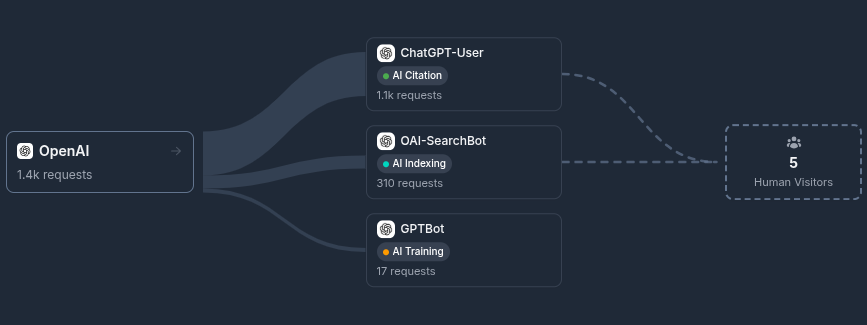
AI crawlers are everywhere in your logs. OpenAI, Google, Perplexity and the rest hit your site thousands of times, but until now there was no way to answer the question that really matters: is any of this crawling turning into real visitors? Bot Conversions answers exactly that. For each producer, meaning the company behind one or more bots, we show you how much it crawls your site and how many human visitors its platforms send back. Attribution works on two signals. When a platform tags its outbound links, we match visits through the utm_source parameter, which gives you high precision. When there is no utm tag, we fall back to the referrer, so visits that arrive with a matching referrer source still get counted. Each visit is counted once, never twice. The Overview page gives you the full picture of which companies are scraping you the most and how many human visitors each one of them brings to your site, so you can see at a glance which bots do the heavy crawling and whether that activity brings anything back. When you want to go deeper, the Producer Analysis page lets you pick a single producer and inspect its converted paths. For every page on your site you see the referred human visits, what share of that page's total human traffic they represent, and the split between utm attributed visits and referrer only visits. Columns are sortable and you can filter by host and pathname, which makes it easy to spot which content actually earns you referrals from a given platform. There is also a new dashboard widget, Crawler to Users Conversions, that shows your top producers with crawls received and real users sent, including comparison arrows against the previous period. You'll find everything under Bot Conversions in the sidebar. Pick a date range and see who is really sending you people.