

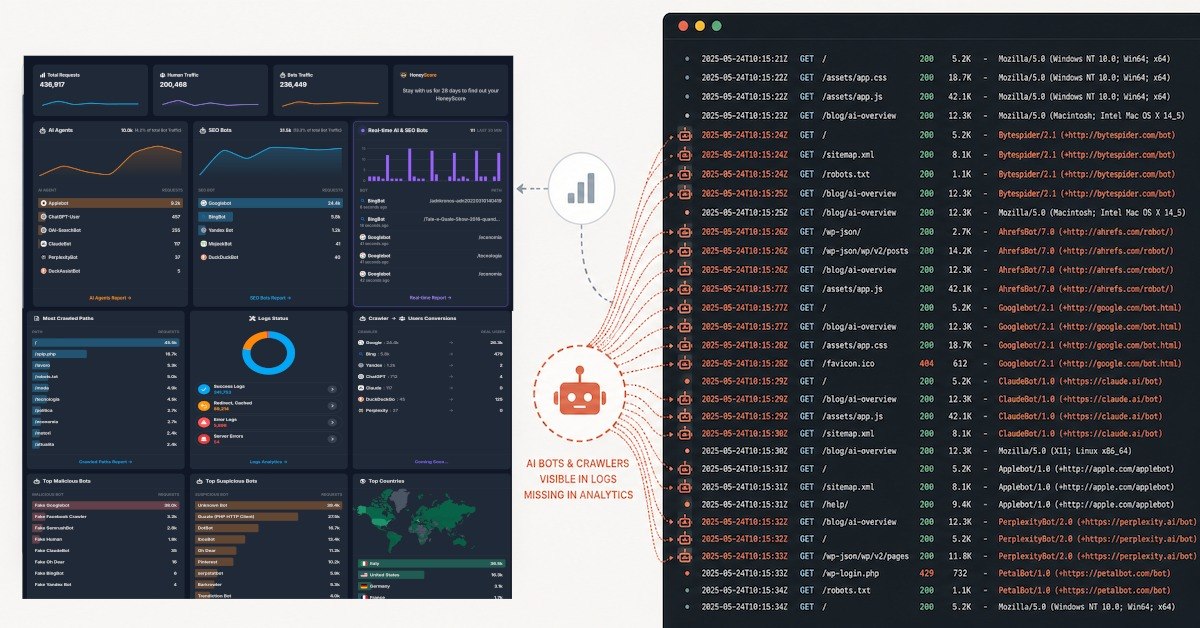
AI bot traffic doesn't show up in Google Analytics because GA4 measures visitors through JavaScript that runs in a browser. Most AI crawlers like GPTBot, GoogleBot, ClaudeBot, PerplexityBot, etc, request your pages directly without executing JavaScript, so the tracking tag never fires and the visit is never recorded. The request still reaches your server, where it is logged at the infrastructure level.
That gap is the whole story, and it's worth understanding properly.
Most teams treat their analytics dashboard as the truth. If GA4 says a page got 4,000 visits last month, that's the number that ends up in the report, the QBR, and the strategy deck. It feels complete because it's the only view most people have. But a dashboard is not a record of everything that happened on your website. It's a record of one specific kind of visitor: a human using a browser that ran your tracking code.
A meaningful share of the traffic hitting your servers right now is being served content, reading it, and leaving without ever appearing in your analytics. Increasingly, that traffic is AI crawlers and agents. If you're a publisher or a content-driven business, that's not a rounding error. It's a blind spot in the exact channel that's reshaping how your content gets discovered.
How Google Analytics tracks visitors (and what it assumes)
GA4, Plausible, Matomo, Adobe Analytics, Chartbeat, Publytics, Marfeel, etc, differ in pricing, privacy posture, and feature depth, but they share one foundational assumption about what a "visitor" is.
In their model, a visit means a person opened your page in a browser. The browser downloaded your HTML, then executed a piece of JavaScript that you placed on the page. That script is what does the real work: it fires a page-view event, reads or sets a cookie, stitches the request into a session, records the referrer, and starts watching for human-like behavior such as scrolling, clicks, and time on page.
Notice where all of that happens. It happens client-side, inside the visitor's browser, after your script runs. The analytics tool never talks to your server directly. It waits for the browser to phone home.
For understanding humans, this design is excellent. It's the reason you can see engaged sessions, conversion paths, and audience segments. But it carries a structural consequence that rarely gets stated out loud: anything that doesn't run your JavaScript doesn't get counted. The measurement depends entirely on the visitor cooperating with the browser-based instrumentation. When a visitor skips that step, the visit still happens, but your dashboard just never hears about it.
Why AI bots and crawlers don't behave like human visitors
A person browsing your site behaves in fairly predictable ways. A bot frequently does none of those things. Many automated clients (and most crawlers specifically) interact with your site in a way that's almost the opposite of a human session:
- They request pages directly, often by hitting URLs from a list rather than navigating through links.
- They don't execute JavaScript, so your analytics tag never fires.
- They don't load third-party tracking scripts at all.
- They don't accept or store cookies.
- They don't create what your analytics tool would recognize as a session.
- They carry little or no useful referrer data.
- They can crawl many URLs quickly and systematically, sometimes touching your entire sitemap in minutes.
- They often identify themselves through a user-agent string, though that signal varies, and not every client is honest about it.
Put those traits together and you get a visitor that is, by design, invisible to a browser-based analytics tool. The tool was built to measure people who run scripts. A client that fetches your HTML and leaves without running anything simply falls outside what it's instrumented to see.
Why AI crawlers make server-side visibility urgent
Crawlers aren't new. Search engines have indexed the web for decades, and most teams learned long ago to ignore that traffic. What's changed is what the crawling is for.
Search is shifting from a referral model to a consumption model. A traditional search engine crawls your page so it can rank it and, ideally, send a human your way. AI answer engines crawl your page so they can read it, summarize it, and answer the user directly, often without the click ever reaching you. Crawlers like GPTBot, GoogleBot, ClaudeBot, PerplexityBot, Google-Extended, and Bytespider are part of this new layer. They access your content as an input to something else.
This is why AI search visibility starts well before a citation ever appears in ChatGPT or Perplexity. Before any model can mention you, surface you, or quote you, something has to access your content in the first place. That access is happening at the server level. It's precisely the part of the funnel your frontend analytics can't see.
So the question quietly shifts. For years the relevant question was "how much human traffic did this page get?" The new question is "which systems are reading this page, what are they taking, and how often?" Most analytics stacks were never built to answer the second one.
What server-side logs reveal that GA4 can't
Here's the part that closes the gap. Your server logs every request it receives, regardless of whether a single line of JavaScript ever ran. The log doesn't care whether the visitor was a human, a search crawler, or an AI agent. If a request came in and content went out, there's a record of it.
That record contains exactly the signals frontend analytics drops: the user-agent that made the request, the specific paths and pages it touched, how often it came back, and precisely when. It's deterministic and infrastructure-level. Instead of inferring activity from browser behavior, it captures the access itself. (This is also the core difference behind any honest Honeylog vs GA4 comparison: one waits for a browser, the other reads the server.)
A simple, common sequence makes the gap concrete:
- A publisher posts a new article.
- A crawler from an AI system requests that URL.
- The crawler doesn't run GA4 (or any client-side tag).
- The analytics dashboard records nothing meaningful.
- The marketing team looks at the dashboard and concludes nothing happened.
- Meanwhile, the server already served the full article to the crawler. The request is sitting in the logs.
Same event. Two completely different stories, depending on where you're looking. The dashboard says silence. The server says a visit occurred. Only one of those is the whole truth.
Why AI bot tracking matters for publishers and SEO teams
This isn't a curiosity for the infrastructure team to file away. It changes what several functions can actually do their jobs.
Publishers need evidence of who is accessing their content before they can make any decision about it, whether that's blocking, allowing, licensing, or monetizing. You can't negotiate over access you can't measure, and you can't set a policy on traffic you can't see. (It's the central problem behind Honeylog's media and publishers use case.)
SEO and audience teams need to know whether AI crawlers are even reaching the pages they spend their time optimizing. Optimizing content for an answer engine that never crawls it is effort spent in the dark.
B2B and corporate sites have the same exposure on pages that matter commercially: are AI systems accessing your product, pricing, and sales pages, and which ones? E-commerce and retail sites face it across product and category pages. SaaS companies face it across documentation, pricing, comparison pages, and the blog. That's the exact content that feeds buyer research, increasingly conducted through an AI intermediary.
In every case, the prerequisite is the same. Visibility comes first. You can't make a sensible choice about access, optimization, or monetization until you can see what's actually being accessed.
How Honeylog shows the AI bot traffic GA4 misses
Honeylog works at the server level. Rather than waiting for a browser to run a tag, it analyzes server-side traffic and logs to identify AI bots, crawlers, and LLM-related activity, and shows what content they accessed, on which paths, and how frequently. It surfaces the layer of traffic that browser-based analytics is structurally built to miss. You can see the underlying detection approach on the features page.
It's worth being precise about how this relates to the AI visibility tools you may already be looking at. Those tools answer an external question: do you get mentioned, cited, or surfaced in AI-generated answers? That's the output side: brand presence in the model's responses. Honeylog answers an internal one: which bots actually visited your site, what did they read, and when? That's the evidence side: real visits, user agents, paths, pages, and access patterns from your own infrastructure.
The two are complementary, not interchangeable. Knowing whether an answer engine cites you is useful. Knowing whether it's even crawling you (and what it's consuming) is the upstream fact that makes the rest interpretable. Honeylog is designed to complement AI visibility tools, not replace them.
What Honeylog can and can't tell you
A word of honesty, because this space is full of overclaiming.
Honeylog does not magically reveal what ChatGPT "knows" about you. It does not prove that a model trained on your content. It does not expose private model internals or reach inside anyone's training pipeline. Anyone promising that is selling a guess.
What Honeylog shows is concrete and verifiable: access, crawling, and traffic patterns from AI bots and crawlers as recorded by your own servers. That's a narrower claim than "we'll tell you what the AI learned", and it's a far more defensible one, because it's grounded in evidence you can point to rather than inference dressed up as certainty.
Frequently asked questions
Does Google Analytics track bots?
Mostly no. GA4 is built around a JavaScript tag that runs in a real browser, and it filters known bot traffic by default. Crawlers that fetch your HTML without executing JavaScript never trigger the tag in the first place, so they don't appear as visits at all: not as humans, and not as bots.
Can GA4 detect AI crawlers like GPTBot or ClaudeBot?
Not reliably. GPTBot, ClaudeBot, PerplexityBot, Google-Extended, Bytespider and similar crawlers typically request pages directly without running client-side scripts. Because GA4 depends on that script firing, these crawler visits usually leave no trace in your analytics, even though the request reached your server and content was served.
How do I see which AI bots are crawling my website?
You need a view of your traffic at the server or edge level, where every request is recorded regardless of whether JavaScript ran. That's what server-side log analysis provides: the user-agent, the paths accessed, the frequency, and the timing. Honeylog is built specifically to read that layer and identify AI bot and crawler activity.
What's the difference between client-side and server-side analytics?
Client-side analytics (like GA4) collect data from inside the visitor's browser after a script executes, which is ideal for understanding human behavior. Server-side analytics record the raw request as it hits your infrastructure, before any script runs, which is the only reliable way to capture non-browser clients such as AI crawlers and bots.
Can Honeylog prove an AI model trained on my content?
No, and it doesn't claim to. Honeylog shows that AI crawlers accessed specific URLs on your site, what they requested, and when. It does not (and cannot) prove what any model was trained on or what it "knows." It provides evidence of access and crawling, not visibility into a model's internals.
If AI systems are becoming a new layer of discovery, the first question is not only whether they mention you. It is whether they are accessing you at all.