

.png)
The problem: a suspicious spike in Google traffic
An Italian digital publisher started Tuesday, October 6, with an above-average morning. Pageviews were up, and the source behind them looked reassuring, because it was Google. At first glance it seemed like good news, until a closer look at where those visitors were landing made the spike hard to explain.
What the client-side analytics showed
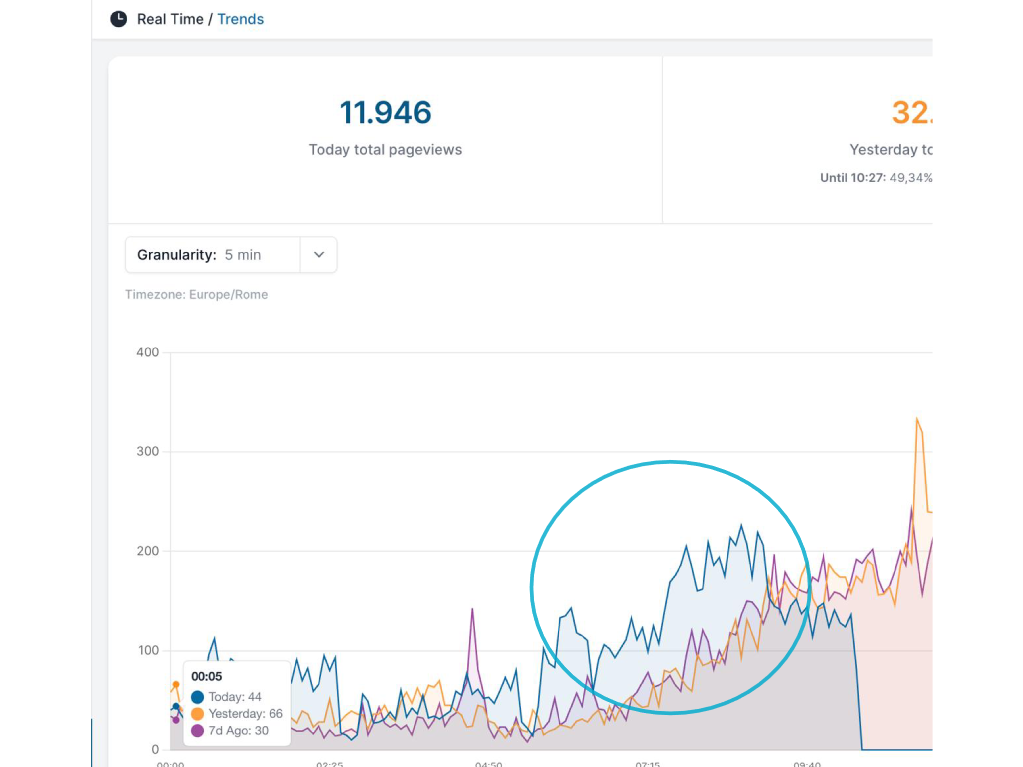
The client-side analytics dashboard caught the spike: between 7:00 and 9:00, pageviews ran at nearly double the previous day’s level, with the extra visits credited to Google. One detail did not fit. About 90% of the extra Google traffic was landing on the homepage, while search users usually arrive on an article, a guide or a specific page. Google Search Console, meanwhile, showed no comparable increase in clicks.
Why the team turned to HoneyLog
GA4 and every other client-side tool only see visitors that run the tracking script, and they rely on the referrer that the browser declares about itself. Modern bots run real browsers in headless mode, executing JavaScript and loading the page exactly as a person would, so they get counted as visitors from whatever source they claim.
The only reliable way to know who sits behind each request is to look at the server side. HoneyLog reads every request that reaches the server, including requests that never run a tracking script. The team queried the logs through the HoneyLog MCP server from an AI assistant, filtering homepage requests with a Google referrer, and it took only a few minutes to turn the suspicion into an answer.
What the HoneyLog data revealed
1) One fingerprint behind most of the “Google” traffic
HoneyLog counted 3,175 homepage requests with a Google referrer between midnight and noon, and 2,755 of them (86.8%) shared exactly the same signature:
- The same user agent on every request: Chrome 154 on Linux.
- The same browser language: US English, on a site written entirely in Italian.
- A bare “google.com” referrer with no protocol, a format that real browsers do not send after a search.
- IP addresses spread across dozens of countries, including the United States, Taiwan, Hong Kong, the Philippines, Brazil and Japan. About 90% of them were residential proxies rather than data centers, chosen to slip past the most common blocking rules.
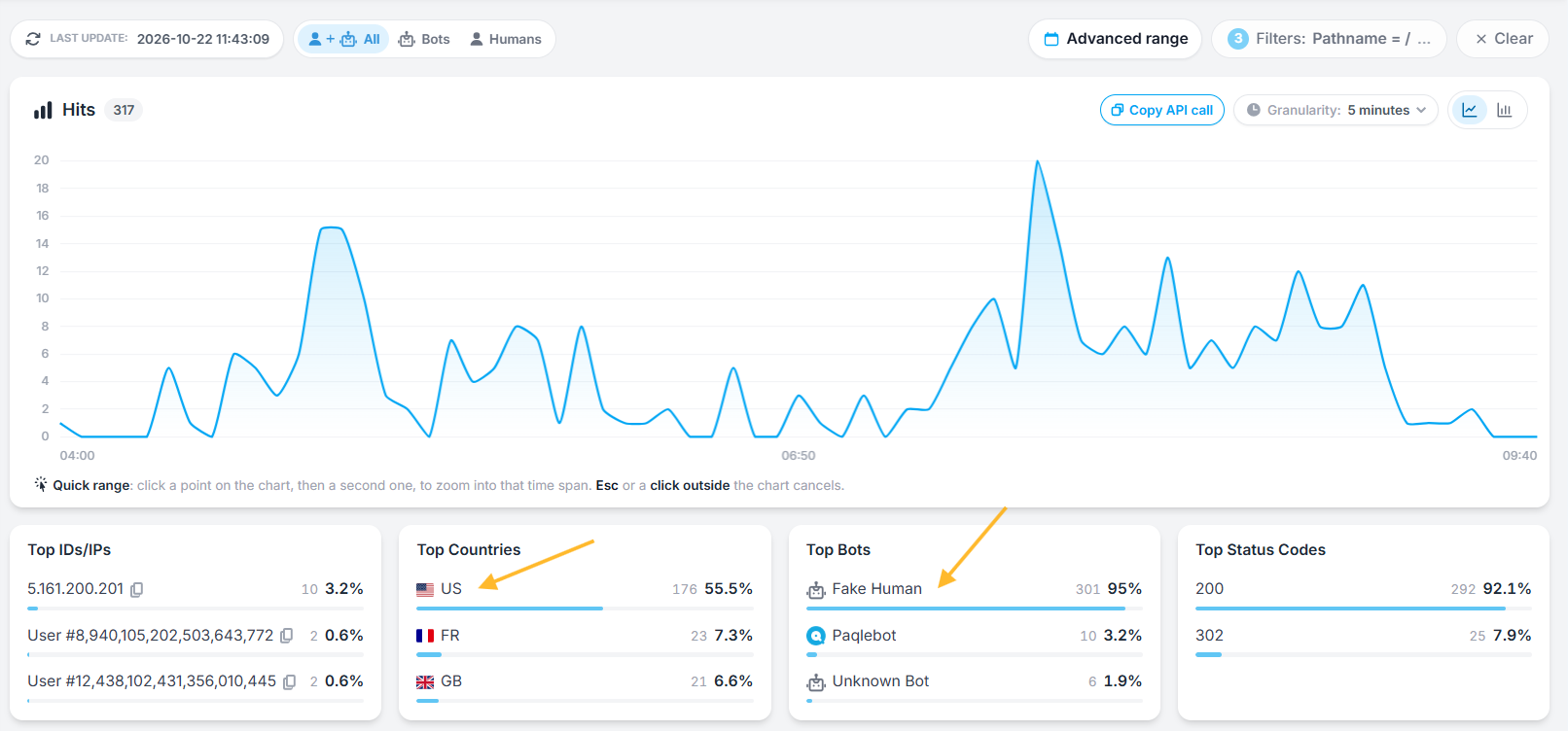
The bot’s share climbed to 95% between 7:30 and 9:00, when it sent 1,294 of the 1,362 Google-referred requests to the homepage, while real Google traffic held steady at 5 to 20 requests every 15 minutes. The HoneyLog dashboard tells the same story at a glance, listing almost all of this homepage traffic under the “Fake Human” bot category, with the United States as the top country.
2) The real target was not the homepage
Every URL the bot requested pointed to a section of the site with data on Italian companies, such as financial statements, business registry records and industry codes, which it was trying to scrape automatically. Each time it hit restricted content, the site redirected it to the login or sign-up page, which lives on the homepage. That is why the analytics showed a wave of homepage visits.
3) Blocking the bot and verifying the rule in real time
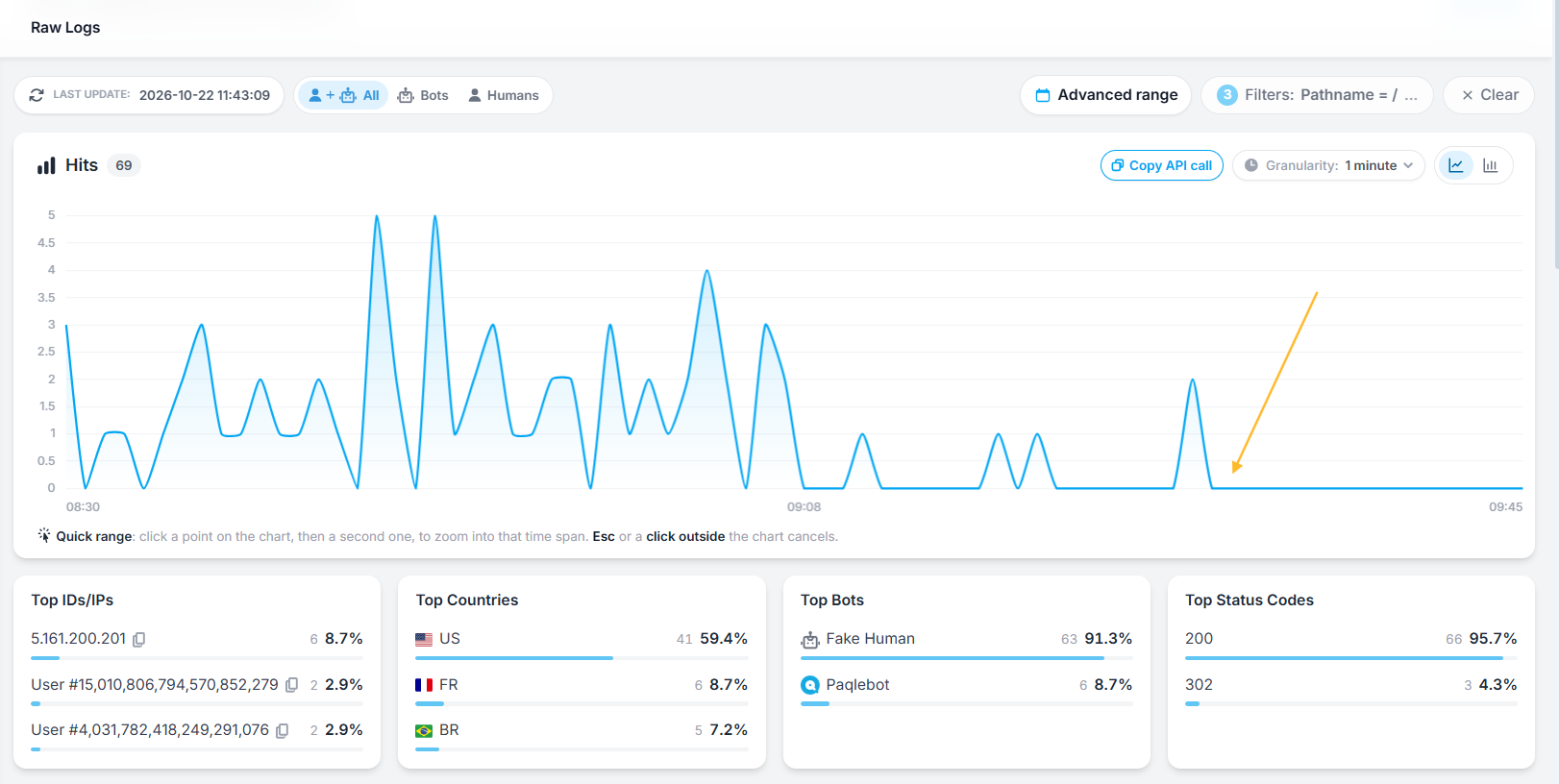
As soon as the problem was clear, the team deployed a Cloudflare rule targeting the bot’s characteristics on the login page. Since HoneyLog logs are available in real time, including through MCP, the effect was visible almost immediately: the bot sent 2,023 requests between 8:00 and 9:00, only 228 in the following hour, and none at all after 09:07:36.
The lesson: you need both views
Client-side analytics and server-side logs answer two different questions, and you need both to see 100% of your traffic.
| Client-side analytics (such as GA4) | Server-side logs (Honeylog) | |
|---|---|---|
| What it sees | Every page that runs the tracking script | Every request that reaches the server |
| Question it answers | What is happening on the site | Who is actually making the requests |
| Key data | Pages, sources, sessions, conversions | IP, network, user agent, language, frequency, status codes |
| Strength | Measures precisely what happens on each page | Reveals who is behind each request |
| Role in this case | Spotted the anomaly | Identified the bot and verified the fix |
In this case, the analytics raised the alarm, and HoneyLog showed who was behind it, how to stop it and whether the fix worked, turning a suspicion into a decision within minutes.