
Has Google seen what I just published?
It’s the question we hear most from publishers and e-commerce teams, and it now has a second half: has ChatGPT seen it too? Search Console tells you days later, and only for Google (and AI assistants tell you nothing at all).
Your server logs already know the answer. Every time Googlebot, BingBot, OAI-SearchBot or ChatGPT-User requests a page, the request is recorded, to the second. HoneyLog reads those logs, separates crawlers from humans and fake bots, and turns them into reports you can act on.
This article covers two features built for SEO and GEO that work as a pair: Discovery (Real Time and Trends) measures how fast every new article is found by search engines, AI assistants and readers; Sitemaps shows what you are telling crawlers and who actually reads it.
Discovery Real Time: the first 24 hours of every article
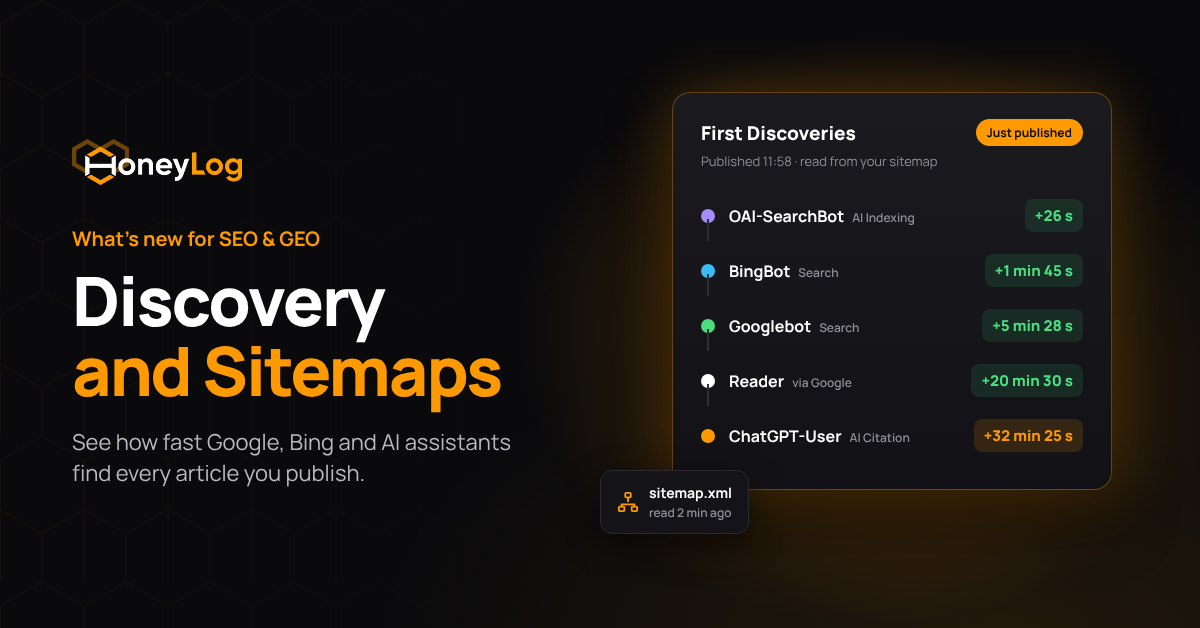
Discovery Real Time answers one question for every URL published in the last 24 hours: who arrived first, and how long did it take? HoneyLog reads the publish time from your sitemaps every few minutes and matches it, to the second, against the first request from each crawler and the first human visitor sent by a search engine or an AI assistant.
Median time to first visit
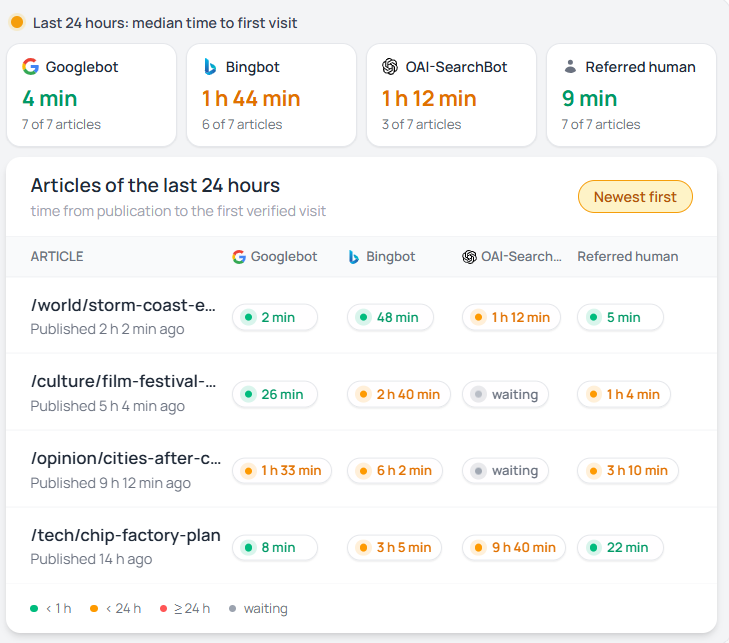
At the top of the page, one card per actor shows the median time between publication and its first visit, together with how many of the day’s articles it has reached so far. The actors fall into four groups:
- First referred human: the first real reader arriving from a search engine or AI assistant.
- Search bots: Googlebot, BingBot.
- AI Indexing bots: OAI-SearchBot, Claude-SearchBot, PerplexityBot, Applebot. They build the indexes AI answers draw from.
- AI Citation bots: ChatGPT-User, Claude-User, Perplexity-User. They fetch a page live because a user’s question needs it: the clearest GEO signal you can get.
Why it matters.
The question “has Google seen it yet?” becomes a number you can check every morning, for search engines and AI assistants alike. A card that stays empty is as telling as a fast one: if an assistant’s citation bot never reaches your new articles, its users are not getting your content in their answers.
Articles of the last 24 hours
Below the cards, the list shows every article behind those medians, with one chip per actor that displays either the delay since publication (+2 min 3 s) or waiting, colour-coded by speed. Clicking an article opens its First Discoveries timeline, which lists every first visit in order together with the HTTP status returned and a link to the raw logs.
Example. When a single article stays on waiting while everything around it has been crawled within minutes, the cause usually lies with that page. When a whole section, subdomain or language edition is waiting, the problem is more likely in its sitemap, feed or internal links, and you can spot it hours before Search Console shows anything.
First bot on scene and first referred human
Two side panels look at the same articles from another angle, namely who gets there first. First bot on scene ranks crawlers by how often they fetch a new article before anyone else, which makes it the place to check whether an IndexNow setup or a new feed has changed the order. First referred human visit shows which source sends the first reader, and an AI assistant appearing in that list means people are clicking through from AI answers to your site.
Discovery Trends: is discovery getting faster or slower?
Real Time shows today; Trends shows the pattern over days and weeks. It only counts articles older than 24 hours, so every number is final, and it is where you prove that a technical change made a difference. Three tabs pick the bot category (Search Bot, AI Citation, AI Indexing) and a Hostname filter isolates one subdomain or language edition.
Median time to first crawl
Each bot gets a card with its median delay over the selected range and the change in the last 24 hours, followed by a chart that plots the median by publish day. A dotted line means the bot crawled none of that day’s articles within 24 hours, while annotations such as a deploy or a sitemap change appear as flags on the chart.
Example.
Every technical change made for SEO or GEO needs proof that it worked. Adding an annotation on the day of the release lets you check a week later whether Googlebot’s median time to first crawl has dropped or whether a previously absent AI bot is now reaching your articles. The same chart also works as an early warning, showing a slowdown in crawling days before it affects traffic and rankings.
Discovery funnel
The funnel shows, for each bot, the share of articles crawled within 1 hour, 24 hours and 7 days. Each step counts only the articles old enough to be judged on that window, so recent days never drag the numbers down.
Example.
On a healthy news site, search bots usually reach most articles within the hour and nearly all of them within a day. The AI tabs are where the differences show up, since one assistant may fetch most of your articles within a day while another never reaches them at all. A bot stuck at 0% on every step, even though it visits the rest of your site, is not finding your fresh content, which makes it a concrete GEO target and a good reason to check how it reads your sitemaps.
Articles table
The table lists every article in the selected range with the first-visit delay for each bot. Filtering on Not crawled turns it into a to-do list, and articles missed for more than 24 hours are flagged as overdue. A single outlier is usually noise, whereas the same delay repeating across one section or hostname points to a problem worth fixing.
Sitemaps: what you tell crawlers, and who reads it
A sitemap is the list of pages you ask crawlers to look at. Discovery uses it to know when each article went live; the Sitemaps section turns it around and shows who reads it and what is in it. Turn on sitemap reading once in the site options and HoneyLog does the rest.
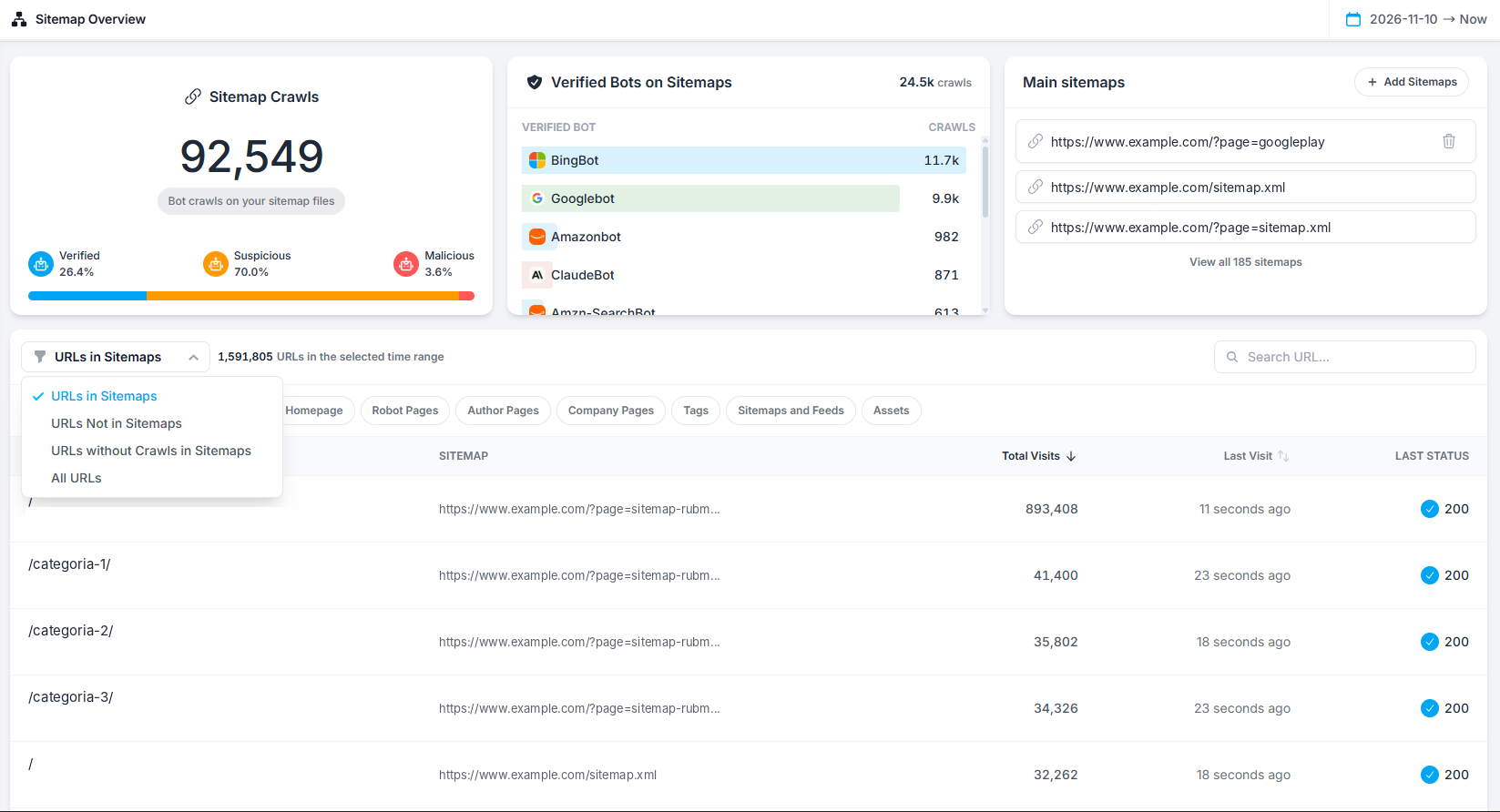
Sitemap Crawls
The first card counts every bot request to your sitemap files in the selected range and splits it into Verified, Suspicious and Malicious traffic, while the panel next to it ranks the verified crawlers by how often they read your sitemaps.
Example.
On many sites, most sitemap requests come from suspicious bots rather than from search engines, because a sitemap is a ready-made list of everything worth copying and scrapers use it that way. The ranking of verified bots tells the other half of the story: if Googlebot and BingBot read your sitemaps constantly while an AI indexing bot almost never does, that bot has to find your new articles through links and feeds, and Discovery Trends will show whether it actually does.
Your sitemaps
HoneyLog finds your sitemaps on its own, looking in robots.txt, at the standard paths and in the links on your homepage, and then opens every sitemap index to reach the sitemaps listed inside. The Main sitemaps card shows the entry points it found, View all opens the complete list with the type and URL count of each sitemap, and Add Sitemaps covers anything that is not linked in a standard place. News sitemaps and feeds are re-read every few minutes, which is what lets Discovery list an article minutes after it goes live.
URLs in Sitemaps
The table at the bottom lists every URL found in your sitemaps with the sitemap it comes from, its total visits, the time of the last visit and the last HTTP status returned. Page-type filters and a URL search narrow the list, while a menu switches between four views: URLs in Sitemaps, URLs Not in Sitemaps, URLs without Crawls in Sitemaps and All URLs.
Example.
Each view answers a different question. URLs in your sitemaps that return a 404 or a redirect are sending crawlers to the wrong place and should be fixed or removed. URLs without crawls are pages you ask bots to visit that nobody has requested, often a sign of weak internal linking. URLs not in your sitemaps are pages that receive traffic without being listed, and some of them may deserve a place there.
Putting it together: a weekly routine
- Every morning, Discovery Real Time. Scan yesterday’s articles for waiting chips. One article waiting is noise; a whole section or hostname waiting means a sitemap, feed or linking problem.
- Once a week, Discovery Trends, on all three tabs. Compare medians with the previous week. Search Bot is your earliest SEO warning; AI Citation and AI Indexing are your GEO scorecard.
- Then Sitemaps. Check that the bots you care about are reading them and that the URLs listed return 200.
- Annotate what you change. A new news sitemap, a feed for AI assistants, an IndexNow setup: mark it, then check Trends the following week to see if it worked.
Try it on your own site
Discovery Real Time, Discovery Trends and Sitemaps are live now in your HoneyLog dashboard. Turn on sitemap reading in the site options: HoneyLog finds your sitemaps on its own.