
Using the Dashboard
Visibility Radar
See which AI and SEO bots crawl your site, how often, and what they read.
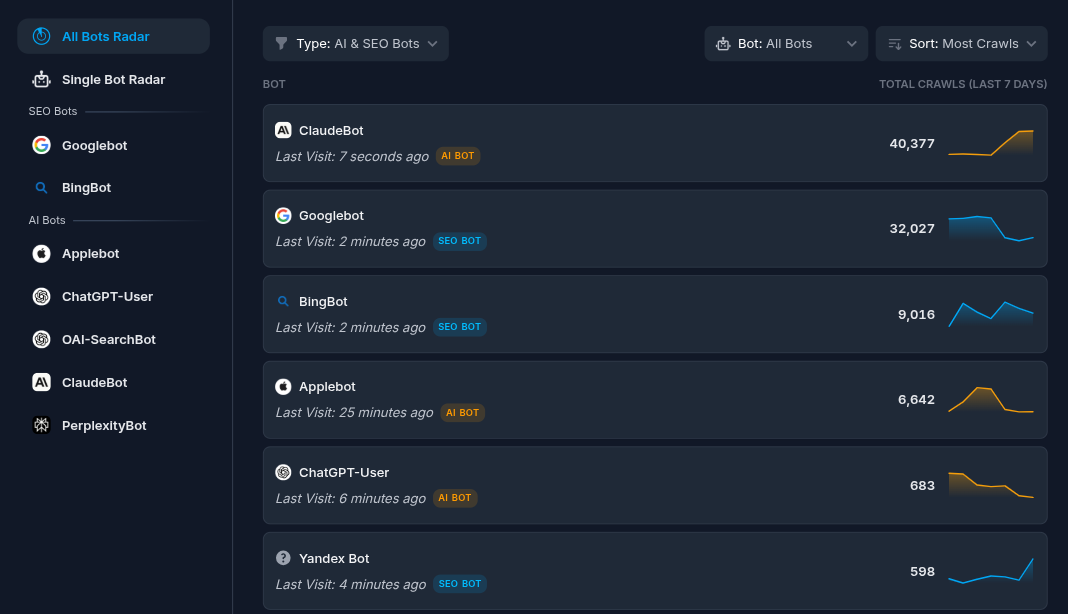
Visibility Radar shows how visible your site is to AI and SEO crawlers. It lists the bots that crawled you over the last 7 days and lets you open any single bot for a closer look. This page is essential for understanding bot behavior over time on your site, understanding scraping patterns (which differ from site to site), and intercepting, promoting, or blocking specific bots with SEO/AEO techniques or individual bot blocks.
#The bot list
Each row is one bot and shows:
- The bot name and an icon.
- A badge marking it as AI or SEO.
- The total number of crawls in the period.
- The last time it visited (for example, "2 hours ago").
- A small 7-day trend line.
#Filtering and sorting
Use the controls above the list to focus it:
- Category — show AI & SEO together, AI only, or SEO only.
- Bot — show all bots or pick one by name.
- Sort — order by most crawls or least crawls.
The list is paginated at 10 bots per page. This page always looks at the last 7 days, independent of the date picker used elsewhere.
#Opening a single bot
Click a bot name to open the single-bot view. It is also reachable directly and can be shared by link, because the chosen bot is kept in the page address.
The single-bot view focuses on one crawler and shows:
- A trend of its crawls over time.
- The paths it requests most.
- Its recent log entries.
Use the search box at the top to switch to a different bot.
To compare bots as aggregate reports instead of one at a time, use Bot traffic.